.png?width=300&height=149&name=Ulleo%20Logo%20RGB%20Black%20(5).png)
You can easily get in touch with your mentor directly through the 1:1 Mentor Messaging feature within your learning platform. Here’s how to contact your mentor:
1. Log in to Your Learning Platform
-
Start by logging into your course via the learning platform.
2. Go to the Mentor Messaging Section
-
Once logged in, look for the Mentor Messaging section on the left-hand side of your screen. This is where you can send and receive messages from your mentor.
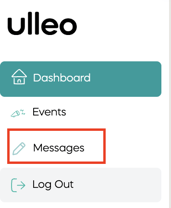
3. Start a New Message
-
Click on Mentor Messaging to open your inbox. To send a new message, type your question or message in the chat box and click Send.
4. Wait for a Response
-
Once you’ve sent your message, your mentor will receive a notification and respond within the platform. You’ll be able to see their response directly in the Mentor Messaging section.
5. Message Your Mentor Anytime
-
You can message your mentor whenever you need guidance, clarification, or feedback. Your mentor will get back to you as soon as they can.
Tips for Effective Communication
-
Be Clear and Specific: Provide clear details about what you need help with to get the most relevant advice.
-
Respect Their Time: Your mentor may not always be available immediately, so give them some time to respond.
-
Check for Replies: Keep an eye on your Mentor Messaging inbox for responses from your mentor.
Need Help Finding Your Mentor’s Contact?
If you're unsure where to find your mentor's details or are having trouble messaging them, feel free to contact support@ulleo.com for assistance.
By following these simple steps, you can easily contact your mentor and receive the support you need to succeed in your course!