.png?width=300&height=149&name=Ulleo%20Logo%20RGB%20Black%20(5).png)
How to set up an account with Barneys Salon Supplies
-
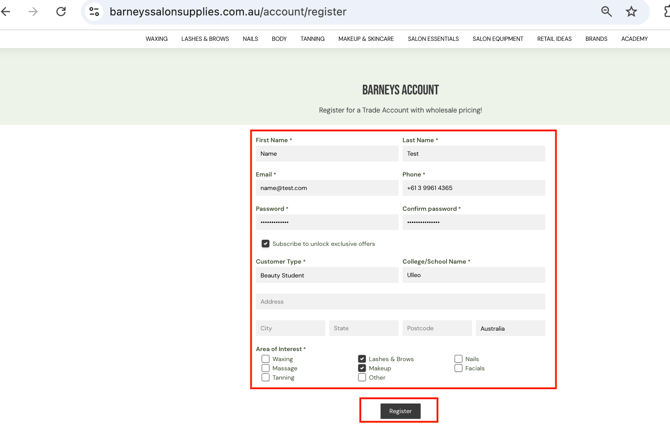
Complete the registration form by entering your: First name, Last name, Country, State, Phone number and Email address and choose a Password.
-
Choose whether you would like to receive promotional emails and exclusive offers by ticking or unticking the "Subscribe to unlock exclusive offers" checkbox.
-
Under Customer Type, select BEAUTY STUDENT.
-
Under College/School Name, enter Ulleo.
-
Enter your address details.
-
Under Area of Interest, select the category that corresponds to your Ulleo course (e.g. Nails, Makeup, Lashes & Brows, Waxing, etc.).
-
Click on REGISTER
-
You will be automatically signed in to your account. Click on “MY ACCOUNT”, you will then see in the top right hand corner “SHOP ULLEO KITS”
-
Navigate to the kit you want to purchase and click on the + icon and then ADD TO CART
-
Navigate to your cart and proceed through to CHECK OUT.
Once your order is complete, you will receive a shipping confirmation email from Barneys Salon Supplies.
Barneys Salon Supplies Orders:
If you ordered a kit, products, or equipment from Barneys Salon Supplies, you can check the status of your order directly by calling (03) 8520 9541 or emailing customercare@barneyssalonsupplies.com.au.
Explore the full kit range in our Kit Catalogue, then shop directly via the Barneys website. If you don't already have an account, follow our step-by-step guide to setting one up.